Spring AI Observability with Langfuse, OpenTelemetry, and Arconia
Integrate a Spring AI application with Langfuse for dedicated AI observability, using OpenTelemetry and Arconia.

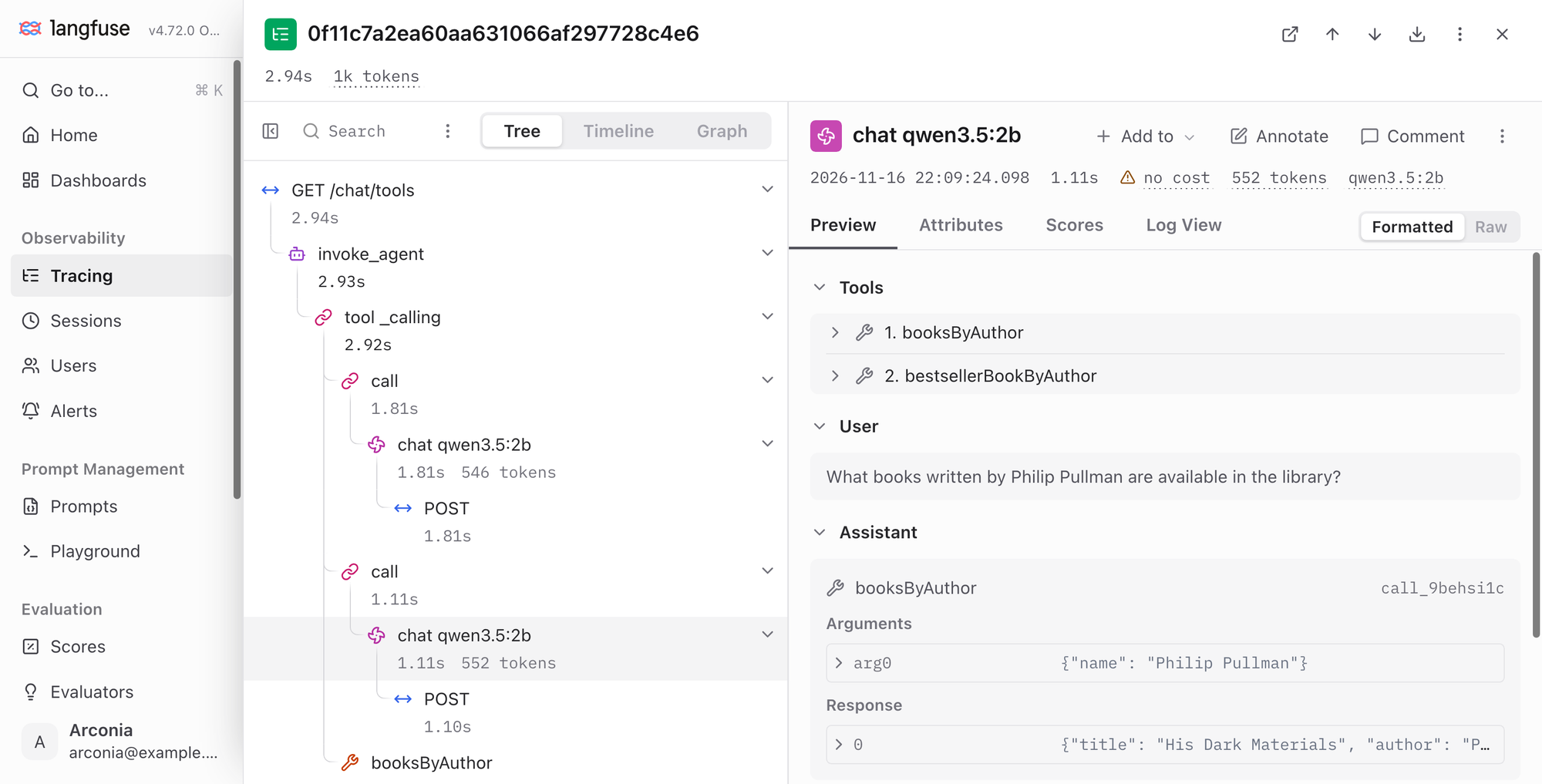
Do you know what your AI application is actually sending to the model? Which prompt, which parameters? How many tokens did the interaction with the inference service consume? Which tool did the model request to execute? Given the complexity and non-determinism of Generative AI workflows, observability isn't optional for AI-infused applications. It's how you understand, debug, and improve them.
In this article, I'll show you how to configure observability for Spring AI applications. We'll be using:
- OpenTelemetry, for gathering and exporting traces from the Java application;
- Langfuse, an open-source LLM engineering platform, for storing and visualizing traces;
- Arconia OpenTelemetry, for adding full OpenTelemetry support to Spring Boot, including the OpenTelemetry Semantic Conventions for Generative AI in the flavor used by Langfuse;
- Arconia Dev Services, for running Langfuse automatically during development, without any extra code or configuration.
Spring AI Observability
The Spring AI project provides built-in instrumentation for models, vector stores, and workflows based on the Micrometer APIs. In fact, I designed and implemented the main observability features in Spring AI, and I keep working on improving and extending them.
With Micrometer, you instrument your code once and then generate different observability signals, including logs, metrics, and traces. Micrometer also allows changing the conventions used by the instrumentation, adapting the exported telemetry to the specific backend.
That last part matters. By default, Spring AI exports telemetry following its own conventions, which AI observability platforms don't recognize. Without the right conventions, they can't show you prompts, token usage, or costs. Arconia builds on top of the default instrumentation to provide multiple semantic-convention modules, making it straightforward to target different AI observability platforms without changing any instrumentation code.
Langfuse
Langfuse is an open-source LLM engineering platform. It offers several useful features to support AI-infused applications, including observability, prompt management, evaluations, and datasets. You can use it as a managed service via Langfuse Cloud or self-host it. When self-hosted, the data that flows through the platform never leaves your infrastructure, an essential aspect when it comes to data privacy.
Langfuse ingests traces via OpenTelemetry and understands the OpenTelemetry Semantic Conventions for Generative AI. It turns the spans it receives into its own observations: generations, embeddings, tool calls, agents, and chains, with their inputs, outputs, token usage, and costs. Arconia offers out-of-the-box support for the Langfuse-flavored conventions, which build on the standard OpenTelemetry ones and add only what Langfuse needs on top. That way, you can integrate your Spring AI application with Langfuse without changing any code.
Self-hosting Langfuse requires a few services besides the Langfuse web and worker applications, including PostgreSQL, ClickHouse, Redis, and an S3-compatible object storage. You can deploy it in any environment, on-premises or in the cloud, using the published container images or the Helm chart for Kubernetes.
What about your development environment? You can certainly use the Docker Compose configuration provided in the Langfuse repository, but with that many moving parts, it doesn't make for the best developer experience. Arconia offers a Langfuse Dev Service as a better alternative. Here's the beauty of it: add a single dependency to your Spring AI project, and you get a fully managed instance of Langfuse provisioned for you whenever you run your application during development, together with all the services it needs: PostgreSQL, ClickHouse, Redis, and Floci as the S3-compatible storage. No configuration, no code changes, no headaches.
In the next section, I'll show you how that works.
Quick Start
Let's build an AI-infused Java application with Spring AI, using Ollama as the model inference service and Langfuse as the observability backend. The entire system will run on your local machine, based on open-source software. You won't need any subscription or cloud service.
1. Project Setup
For this example, I'll use Spring Boot 4.1, Spring AI 2.0, Gradle, and Java 25. Here's how the dependencies section of your build.gradle file should look:
dependencies {
    implementation 'io.arconia:arconia-opentelemetry-spring-boot-starter'
    implementation 'io.arconia:arconia-opentelemetry-semantic-conventions'
    implementation 'io.arconia:arconia-opentelemetry-ai-semantic-conventions'

    implementation 'org.springframework.boot:spring-boot-starter-webmvc'
    implementation 'org.springframework.ai:spring-ai-starter-model-ollama'

    developmentOnly 'org.springframework.boot:spring-boot-devtools'
    testAndDevelopmentOnly 'io.arconia:arconia-dev-services-langfuse'
    testAndDevelopmentOnly 'io.arconia:arconia-dev-services-ollama'

    testImplementation "org.springframework.boot:spring-boot-starter-webmvc-test"
    testRuntimeOnly 'org.junit.platform:junit-platform-launcher'
}

dependencyManagement {
    imports {
        mavenBom "io.arconia:arconia-bom:0.32.0"
        mavenBom "org.springframework.ai:spring-ai-bom:2.0.2"
    }
}
The key dependencies are:
arconia-opentelemetry-spring-boot-starter: Arconia OpenTelemetry simplifies observability for Spring Boot applications by combining the standardization of OpenTelemetry with the robustness of Micrometer, delivering a unified solution for all your telemetry needs in Java.arconia-opentelemetry-semantic-conventions: Arconia Semantic Conventions align the general telemetry of your application with the OpenTelemetry Semantic Conventions.arconia-opentelemetry-ai-semantic-conventions: brings to Spring AI support for the OpenTelemetry Semantic Conventions for Generative AI, including the specific flavor used by Langfuse.arconia-dev-services-langfuse: Arconia Dev Services offer zero-code, zero-config integration with Langfuse, providing a complete LLM engineering platform right in your development environment.arconia-dev-services-ollama: starts an Ollama container during development, in case you don't have Ollama running natively on your machine.
Notice the testAndDevelopmentOnly scope for the Dev Services: they're never included in your production artifact.
Ollama is an open-source platform for running models locally, keeping your data private. You have two options:
- Native installation (recommended). Ollama is available as a native application for macOS, Linux, and Windows. Follow the download instructions to install it. It includes built-in GPU acceleration, so performance will vary depending on the resources available on your computer.
- No installation. If Arconia doesn't detect a running Ollama instance, the Ollama Dev Service will start one for you as a container.
Either way, you can choose from the many open models available in the Ollama model library.
2. Configuring the Model Inference Service
For this example, we'll use qwen3.5:2b, an open-source chat model (Apache 2.0) available for direct serving in Ollama.
You can specify the model via configuration properties in the application.yml or application.properties file of your application:
spring:
  application:
    name: spring-ai-langfuse
  ai:
    ollama:
      init:
        pull-model-strategy: when-missing
        embedding:
          include: false
      chat:
        model: qwen3.5:2b
A few things to notice:
- The
pull-model-strategyproperty instructs Spring AI to download the model via Ollama if it's not already available on your machine. Since we only need a chat model, we exclude the other model types from the automatic download. - The application name is used to categorize the exported telemetry data, so make sure you set it.
3. Building a Chat Client
Let's now implement an HTTP endpoint we can call to interact with a chat model. Spring AI provides the ChatClientAPI to send chat requests to an inference service. Since our project is configured with Ollama, the ChatClient is auto-configured to interact with it.
@RestController
class ChatController {

    private final ChatClient chatClient;

    ChatController(ChatClient.Builder chatClientBuilder) {
        this.chatClient = chatClientBuilder.build();
    }

    @GetMapping("/chat")
    String chat(String question) {
        return chatClient
                .prompt(question)
                .call()
                .content();
    }

}
Notice there's no observability code here. Spring AI instruments the ChatClient and the underlying chat model out of the box.
ChatClient API in the documentation.4. Enabling the Langfuse Semantic Conventions
The arconia-opentelemetry-ai-semantic-conventions dependency provides out-of-the-box support for the OpenTelemetry Semantic Conventions for Generative AI. Langfuse ingests those conventions directly, but it needs a few extra details to build its observations. For example, it doesn't derive chains from the standard conventions on its own, so Spring AI advisors wouldn't show up as such.
Arconia takes that into account and lets you choose which flavor of the conventions to use, based on the requirements of the AI observability platform in use. You can enable the Langfuse flavor via configuration properties:
arconia:
  observations:
    conventions:
      opentelemetry:
        ai:
          flavor: langfuse
The content of prompts and responses, as well as tool arguments, results, and definitions, can be sensitive. When using the Langfuse flavor, Arconia captures all of it by default, aligning with the default behavior of the official Langfuse SDKs. If you don't want that, you can disable it via the capture-message-content, capture-tool-definitions, and capture-tool-call-content properties under arconia.observations.conventions.opentelemetry.ai.
arconia:
  observations:
    conventions:
      opentelemetry:
        ai:
          flavor: langfuse
          capture-message-content: false
          capture-tool-definitions: false
          capture-tool-call-content: false
You can check the documentation to learn about all the configuration properties available. For this example, let's keep the content capture enabled, so we can see prompts and responses in Langfuse.
5. Running the Application
It's time to see the example in action. First, make sure you have a container runtime available on your machine, such as Podman or Docker, since the Arconia Dev Services need it. Then, fire up your app using the standard Spring Boot command for Gradle:
./gradlew bootRun
Or, if you prefer using the Arconia CLI:
arconia dev
When you run the application, the Arconia Dev Services will automatically start a local Langfuse instance using Testcontainers, together with the services it needs. Then, they configure the application to export traces to it, authenticated with the API keys of a pre-provisioned Langfuse project. If Ollama is running natively on your machine, the application will use it. Otherwise, an Ollama container will be started as well.
In the application logs, you'll find the URL for accessing the Langfuse UI:
...Dev Service 'langfuse' links: Langfuse UI: http://localhost:<port>
Sign in with arconia@example.com (email) and password (password), then open the Arconia project.
6. Calling the application
Let's verify the application is working as expected. For this example, I'll use httpie, a command-line HTTP client that makes it easy to interact with HTTP APIs.
From a Terminal window, call the /chat endpoint with a question you'd like the model to answer:
http :8080/chat question=="What is the capital of Italy?" -b
The result should be something like this:
The capital of Italy is Rome.
Feel free to send a few different requests so that the application, under the hood, generates more traces and sends them to Langfuse.
/chat/tools endpoint where the model can call a tool to answer your question. Try it with http :8080/chat/tools authorName=="Philip Pullman" -b. In Langfuse, you'll find each tool execution as a tool observation, with its arguments and result, between the generations of the chat model.7. Inspecting the Telemetry Data
Finally, it's time to gain insights into how our application interacted with the inference service. In a web browser, open the Langfuse UI using the URL shown in the application logs. The homepage of the Arconia project gives you an overview of the application's activity, with statistics based on the traces: how many traces were tracked for each endpoint, the token usage and cost for each model, and the observations over time.
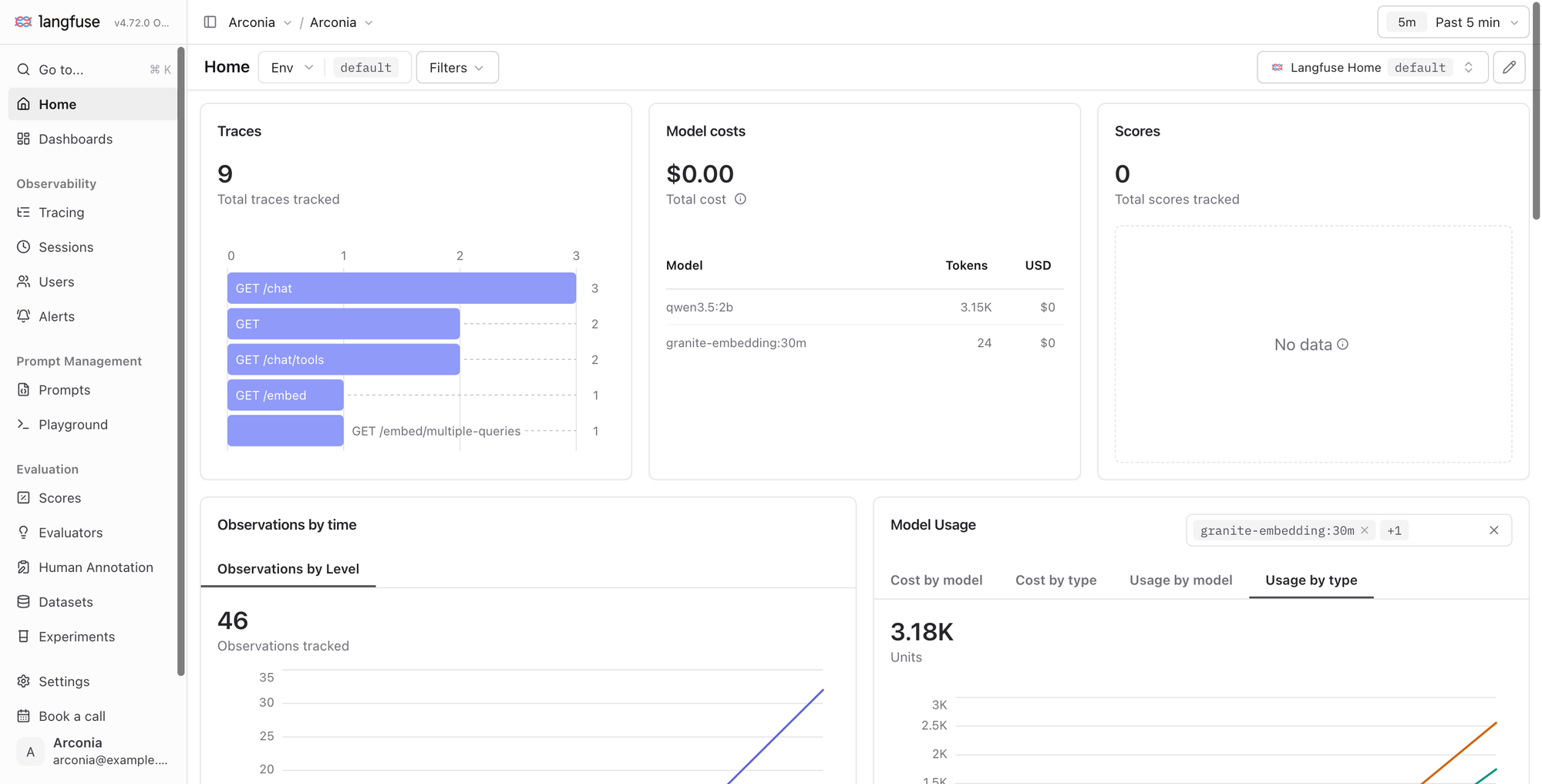
Notice that the total cost is $0. That's because we're running the entire system locally with Ollama, so there's no token cost. If you replace Ollama with a cloud inference service, Langfuse will calculate the cost of each interaction based on the model and the token usage.
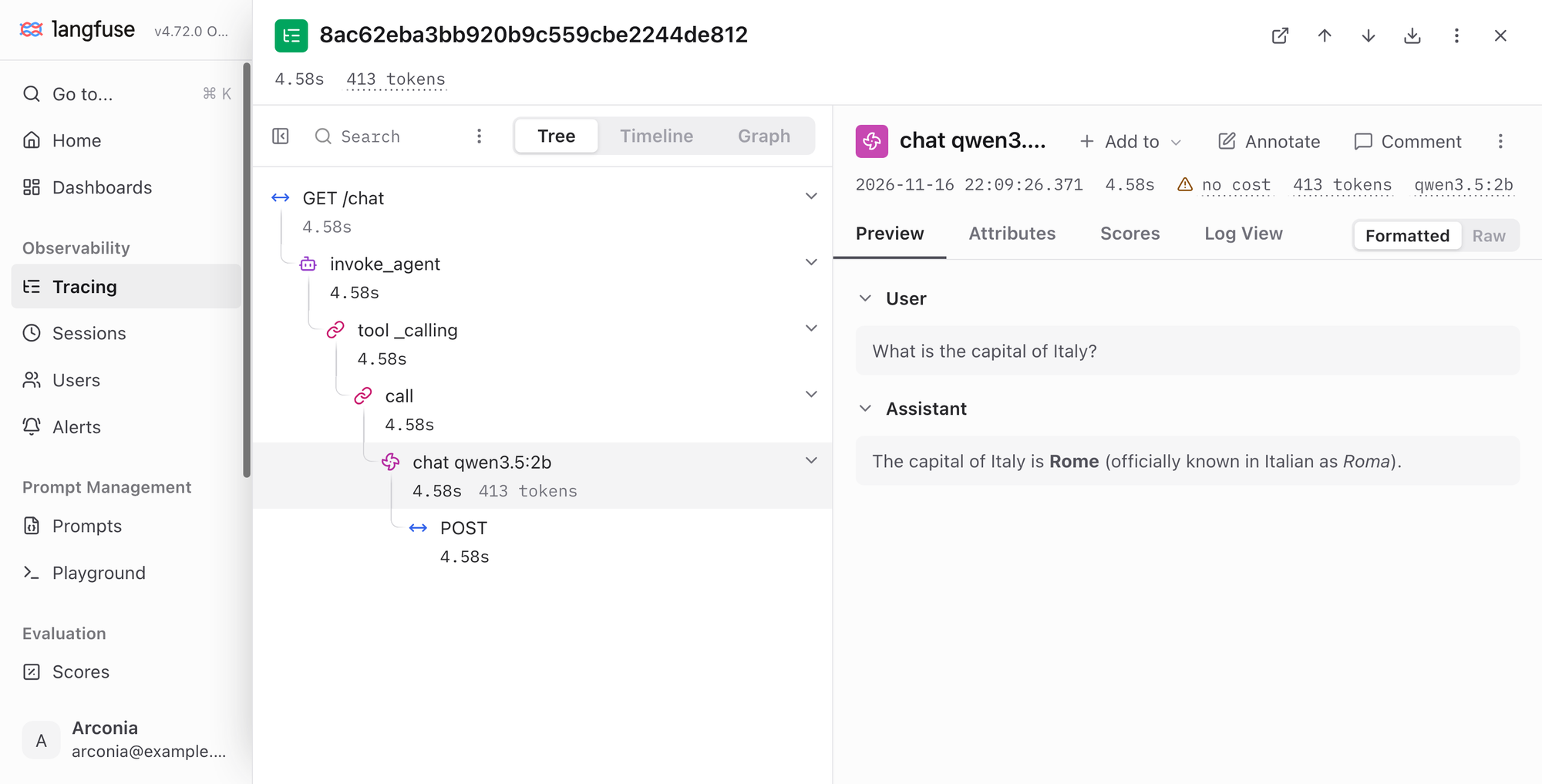
Now navigate to the Tracing page. You'll find one trace for each request you sent to the application. Open one of the GET /chat traces. Langfuse shows how the request was handled as a tree of observations:
invoke_agentis the agent observation for the call to theChatClient.tool_callingandcallare chain observations for the Spring AI advisors the request goes through inside theChatClient.chat qwen3.5:2bis the generation for the call to the chat model, including the underlying HTTP request to Ollama.
Select the generation to see its details: the input and output messages, the model, its parameters, and the token usage. It's marked with no cost, for the same reason we saw on the homepage. Besides the Tree view, you can also explore the trace in the Timeline and Graph views.
Going to Production
The Langfuse Dev Service is only active during development and testing. When you deploy your application, point it to Langfuse Cloud or to your own Langfuse deployment.
Configure the OTLP exporter with the endpoint of your Langfuse instance and the API keys of your Langfuse project, encoded as base64(<public-key>:<secret-key>) in a LANGFUSE_AUTH environment variable. Since Langfuse accepts only traces via OTLP, you can also disable the export of logs and metrics:
arconia:
  otel:
    exporter:
      otlp:
        endpoint: https://cloud.langfuse.com/api/public/otel
        headers:
          Authorization: Basic ${LANGFUSE_AUTH}
          x-langfuse-ingestion-version: 4
    logs:
      exporter:
        type: none
    metrics:
      exporter:
        type: none
The x-langfuse-ingestion-version header is required by Langfuse for OpenTelemetry exporters. For the US region of Langfuse Cloud, use https://us.cloud.langfuse.com/api/public/otel as the endpoint.
Alternatively, you can use the standard OpenTelemetry environment variables:
OTEL_EXPORTER_OTLP_ENDPOINT=https://cloud.langfuse.com/api/public/otel
OTEL_EXPORTER_OTLP_HEADERS="Authorization=Basic <base64-encoded-api-keys>,x-langfuse-ingestion-version=4"
The semantic conventions configuration stays the same: no code changes are needed when moving from development to production.
Conclusion
In this article, I showed you how to integrate a Spring AI application with Langfuse for dedicated AI observability. Building on the out-of-the-box instrumentation in Spring AI, Arconia lets you adopt the semantic conventions expected by your AI observability platform without changing any code, including the flavor used by Langfuse. And thanks to the Langfuse Dev Service, you get a complete LLM engineering platform in your development environment, with all its services, and a seamless developer experience.
If you're evaluating different platforms, check out the companion articles on LangSmith and OpenLIT. With Arconia, switching from one to the other is a matter of changing a dependency and a configuration property. Stay tuned for more articles in the series!
Are you using Spring AI? What's your current strategy for observability? Have you tried Langfuse? I'd love to hear from you! Share your experience on Bluesky or LinkedIn. And if you'd like to contribute to the Arconia framework, feel free to reach out on our GitHub project!
First version published on November 16th, 2026.