Spring AI Observability with OpenLit, OpenTelemetry, and Arconia
Integrate a Spring AI application with OpenLit for dedicated AI observability, using OpenTelemetry and Arconia.

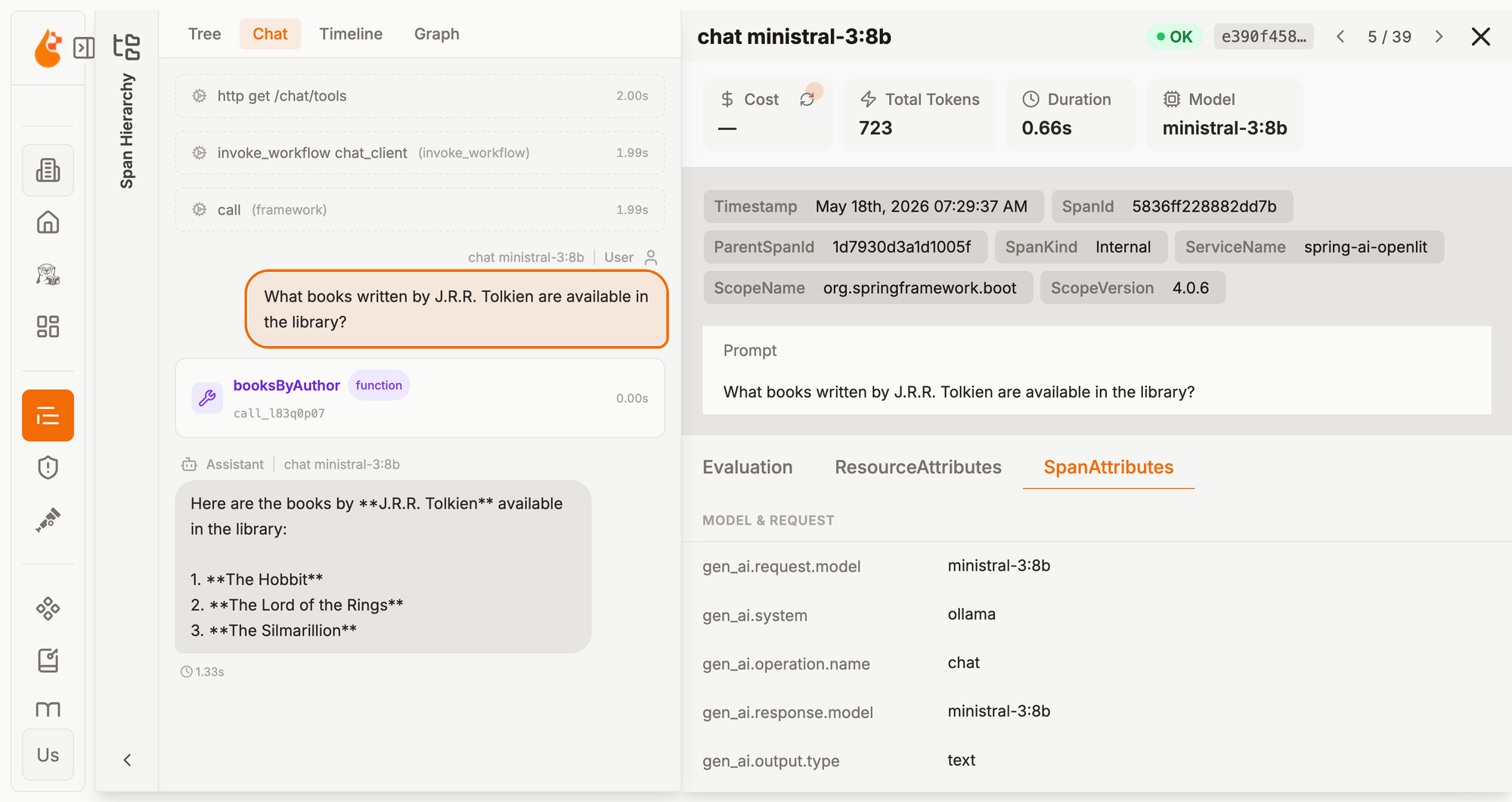
Observability is a key property of any production-grade application. Even more so for AI-infused applications, given the complexity and non-determinism of Generative AI-driven workflows. What prompt is sent to the model? What parameters were used? How many tokens were consumed in the interaction with an inference service? Which tool did the model request to execute?
In this article, I'll show you how to configure observability for Spring AI applications. We'll be using:
- OpenTelemetry for gathering and exporting logs, metrics, and traces from the Java application;
- OpenLit, an open-source AI engineering platform, for storing and visualizing telemetry;
- Arconia for adding full OpenTelemetry support to Spring Boot (including support for the OpenTelemetry Semantic Conventions for Generative AI in the flavor used by OpenLit) and for using an OpenLit Dev Service that will provision an OpenLit instance during development without any extra code or configuration.
Spring AI Observability
The Spring AI project provides built-in instrumentation for models, vectors, and workflows based on the Micrometer APIs. In fact, I designed and implemented the main observability features in Spring AI, and continue working on it to improve and extend it.
The beauty of the Micrometer APIs is that you instrument your code once and then generate different observability signals, including logs, metrics, and traces. Micrometer also allows changing the conventions used by the instrumentation, adapting the exported telemetry to the specific backend.
Arconia builds on top of that built-in instrumentation to provide multiple semantic-convention modules, making it straightforward to target different AI observability platforms without changing any instrumentation code.
OpenLit
OpenLit is an open-source AI engineering platform (Apache 2.0). It offers several useful features to support AI-infused applications, including observability, evaluation, prompt management, and guardrails. Since you can self-host it, the data that flows through the platform never leaves your infrastructure, an essential aspect when it comes to data privacy.
The observability features in OpenLit are based on OpenTelemetry and support metrics and traces. Logs are supported for storing, but they're not directly searchable via the UI. The conventions adopted by OpenLit are built on top of the experimental OpenTelemetry Semantic Conventions for Generative AI, with some changes and additions. Arconia offers out-of-the-box support for the OpenLit-flavored conventions, so that you can integrate your Spring AI application with OpenLit without the need for changing any code.
Running OpenLit requires ClickHouse, an open-source real-time analytics database management system. You can deploy OpenLit in any environment, on-premises or in the cloud. The project publishes container images you can use to run OpenLit on any container runtime, and it also offers a Helm chart to simplify deployments on Kubernetes, which also installs ClickHouse.
What about your development environment? While you can certainly use the Docker Compose example configuration provided in the OpenLit repository, that doesn't enable the best developer experience. Arconia offers an OpenLit Dev Service as a better alternative. Here's the beauty of it: add a single dependency to your Spring AI project, and you get a fully managed instance of OpenLit provisioned for you whenever you run your application during development: no configuration, no code changes, no headaches.
In the next section, I'll show you how that works.
Quick Start
Let's build an AI-infused Java application with Spring AI using Ollama as the model inference service and OpenLit as the observability backend. The entire system will run on your local machine based on open-source software. No subscription or cloud service will be needed.
1. Project Setup
For this example, I'll use Spring Boot 4.0, Spring AI 2.0, Gradle, and Java 25. Here's how the dependencies section of your build.gradle file should look:
dependencies {
    implementation 'io.arconia:arconia-opentelemetry-ai-semantic-conventions'
    implementation 'io.arconia:arconia-opentelemetry-spring-boot-starter'

    implementation 'org.springframework.boot:spring-boot-starter-webmvc'
    implementation 'org.springframework.ai:spring-ai-starter-model-ollama'

    developmentOnly 'org.springframework.boot:spring-boot-devtools'
    testAndDevelopmentOnly 'io.arconia:arconia-dev-services-ollama'
    testAndDevelopmentOnly 'io.arconia:arconia-dev-services-openlit'

    testImplementation "org.springframework.boot:spring-boot-starter-webmvc-test"
    testRuntimeOnly 'org.junit.platform:junit-platform-launcher'
}

dependencyManagement {
    imports {
        mavenBom "io.arconia:arconia-bom:0.27.1"
        mavenBom "org.springframework.ai:spring-ai-bom:2.0.0-M6"
    }
}
The key dependencies are:
arconia-opentelemetry-spring-boot-starter: Arconia OpenTelemetry simplifies observability for Spring Boot applications by combining the standardization of OpenTelemetry with the robustness of Micrometer to deliver a unified solution that covers all your telemetry needs for Java.arconia-opentelemetry-ai-semantic-conventions: Arconia Semantic Conventions bring to Spring AI support for the OpenTelemetry Semantic Conventions for Generative AI, including the specific flavor used by OpenLit.arconia-dev-services-openlit: Arconia Dev Services offers zero-code, zero-config integration with OpenLit, providing a complete AI observability platform right in your development environment.
Ollama is an open-source platform for running model inference services locally, keeping your data private. It's available as a native application for macOS, Linux, and Windows. Follow the download instructions to install Ollama. It includes built-in GPU acceleration, so performance will vary depending on the resources available on your computer.
Using Ollama, you can run any large language model locally, choosing from the many options available in the model library. We will use open-source models from Mistral AI's Ministral family.
2. Configuring the Model Inference Service
For this example, we'll use the ministral-3:3b chat model built by Mistral AI. It's an open-source model (Apache 2.0) that's available for direct serving in Ollama.
You can specify the model via configuration properties in the application.yml or application.properties file of your application. You can also instruct Spring AI to download the model for you via Ollama in case it's not already available on your machine.
Make sure you also specify a name for the application, as that information will be used to categorize the telemetry data exported.
spring:
  application:
    name: spring-ai-openlit
  ai:
    ollama:
      init:
        pull-model-strategy: when-missing
        embedding:
          include: false
      chat:
        model: ministral-3:3b
3. Building a Chat Client
Let's now implement an HTTP endpoint we can call to interact with a chat model. Spring AI provides the ChatClient API that we can use to send chat requests to an inference service. Since our project is configured with Ollama, the ChatClient is auto-configured to interact with that.
@RestController
class ChatController {

    private final ChatClient chatClient;

    ChatController(ChatClient.Builder chatClientBuilder) {
        this.chatClient = chatClientBuilder.build();
    }

    @GetMapping("/chat")
    String chat(String question) {
        return chatClient
                .prompt(question)
                .call()
                .content();
    }

}
ChatClient API in the documentation.4. Enable the OpenLit Semantic Conventions
The arconia-opentelemetry-ai-semantic-conventions dependency provides out-of-the-box support for the OpenTelemetry Semantic Conventions for Generative AI. OpenLit reuses many of them but also adopts additional conventions. Furthermore, in some cases, it uses conventions that conflict with the upstream OpenTelemetry conventions.
Arconia takes that into account and offers the possibility to choose which flavor to use for the conventions, based on specific requirements dictated by the given AI observability platform in use. You can enable the OpenLit flavor via configuration properties in the application.yml or application.properties file of your application.
arconia:
  observations:
    conventions:
      opentelemetry:
        ai:
          flavor: openlit
5. Running the Application
It's time to see the example in action. First, make sure you have a container runtime available on your machine, such as Podman or Docker, since that's required for the Arconia Dev Services to work. If you have installed Ollama, ensure it's up and running. Then, fire up your app using the standard Spring Boot command for Gradle:
./gradlew bootRun
Or, if you prefer using the Arconia CLI:
arconia dev
When you run the application, Arconia Dev Services will automatically start a local OpenLit instance using Testcontainers and configure the application to export telemetry data to it. If a native Ollama service is detected running on your machine, it will be used. Otherwise, Arconia Dev Services will automatically start an Ollama container as well.
If you check the logs of your application, you'll find the URL for accessing the OpenLit UI.
...i.a.t.openlit.OpenLitContainer: OpenLit UI: http://localhost:<port>
When you access the OpenLit UI, you'll be automatically authenticated as a demo user (email: user@openlit.io, password: openlituser).
6. Calling the application
Let's verify the application is working as expected. For this example, I'll use httpie, a command-line HTTP client that makes it easy to interact with HTTP APIs.
From a Terminal window, call the /chat endpoint with a question you'd like the model to answer:
http :8080/chat question=="What is the capital of Italy?" -b
Feel free to send a few different requests so that the application, under the hood, generates various metrics and traces data and sends them to OpenLit.
7. Inspecting the telemetry data
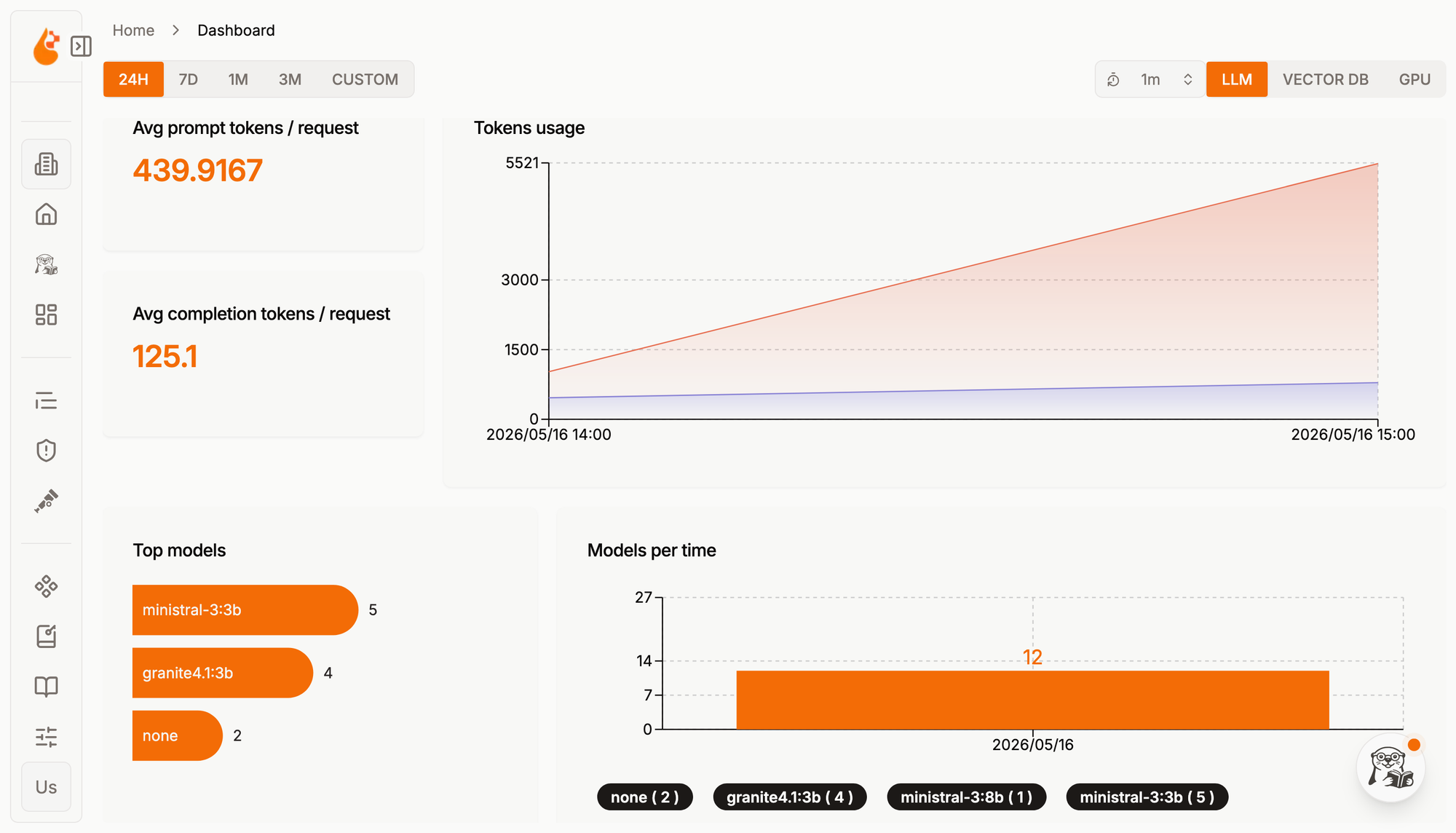
Finally, it's time to gain insights into how our application interacted with the inference service. In a web browser, visit the OpenLit UI using the URL shown in the application logs. Navigate to the /dashboard page, where you should see the default dashboard for LLM interactions, showing statistics based on the application's metrics.
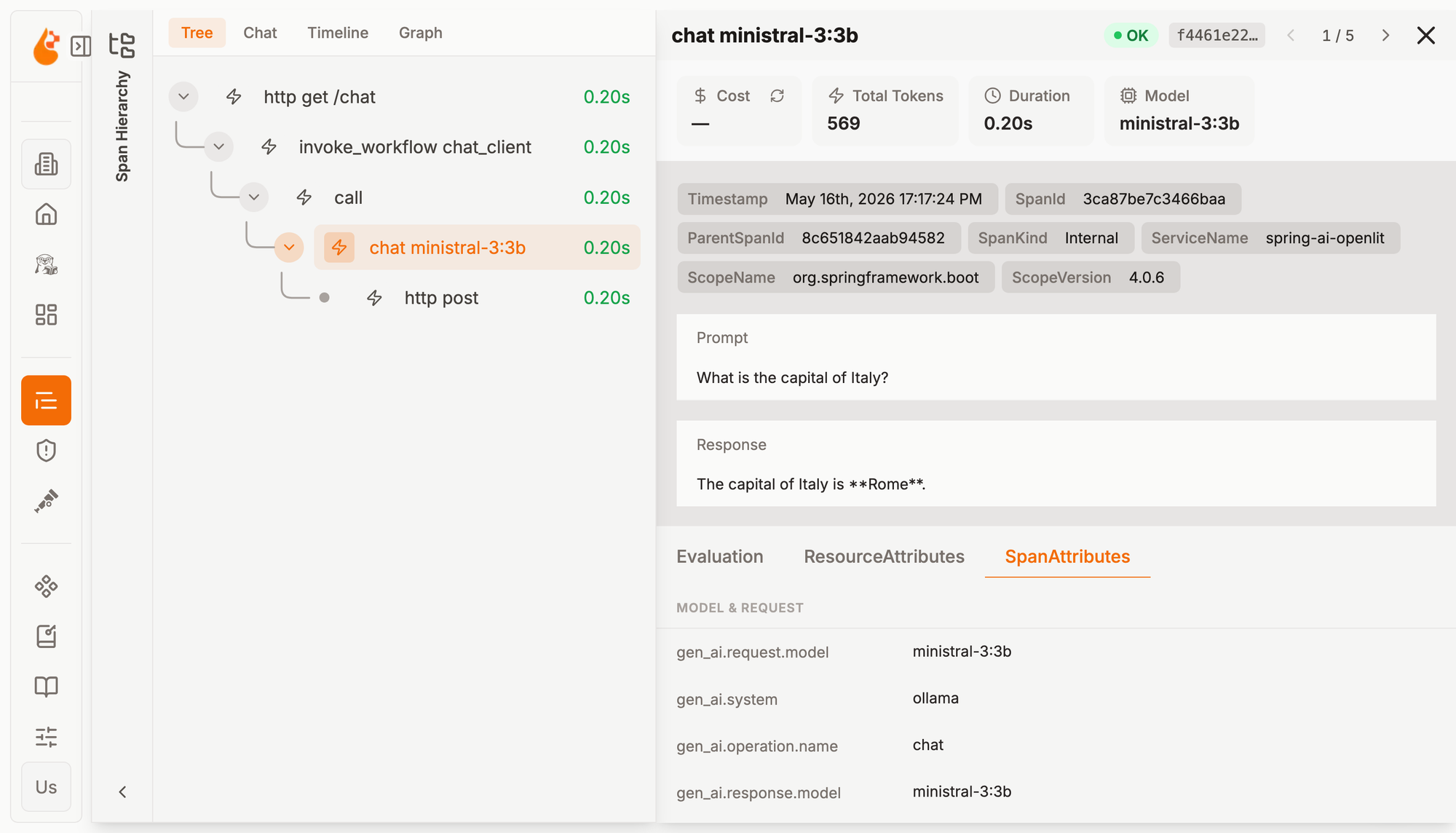
Now navigate to the Requests page (/requests). Here you’ll find all the data from the application's traces. You can gain more insights into how the application interacted with Ollama by expanding the spans named chat ministral-3:3b.
OpenLit renders the different details of the LLM operation, including token usage, model, prompt, and response. In this example, you can see that no cost information is shown. That’s because we’re using Ollama and running the entire system locally, so there’s no token cost. If you replace Ollama with a cloud inference service, OpenLit will also show the cost.
The content of the prompt and response can be sensitive. When using the OpenLit flavor of the OpenTelemetry Semantic Conventions, Arconia enables the capturing of prompt and response content to align with the default behavior in the OpenLit SDK for Python and TypeScript. You can always disable that via configuration properties in the application.yml or application.properties file of your application.
arconia:
  observations:
    conventions:
      opentelemetry:
        ai:
          capture-content: none
You can check the documentation to learn about all the configuration properties available.
Conclusion
In this article, I showed you how to integrate a Spring AI application with OpenLit for dedicated AI observability.
Building on the out-of-the-box instrumentation in Spring AI, I covered how Arconia enables adopting different semantic conventions for telemetry data without changing any code, including the flavor used by OpenLit.
Furthermore, the OpenLit Dev Service offers a superior development and testing experience, providing an OpenLit instance without any extra code or configuration.
Are you using Spring AI? What's your current strategy for observability? Have you tried OpenLit? I'd love to hear from you! Share your experience on Bluesky or LinkedIn. And if you'd like to contribute to the Arconia framework, feel free to reach out on our GitHub project!
First version published on May 17th, 2026.